Traffic Lights
A traffic light physical object is part of the scenery and is defined in the road network layer (lanelet). However, the state is dynamic and must be defined in the GeoScenario file. For exmaple, the standard green, yellow,red states. Note that different countries can have different states and standard sequences.
The time per state is given in (s) as a list with the 'duration' attribute, or optionally as 'intervals" in Sim Time. Traffic light states can also be changed by trigger (see orchestration section).
Additional light types (e.g., turn, pedestrian walk, etc) can be added either as an independent traffic light element, or as part of the same interconnected traffic light state as sublights.
Some physical attributes that are not present in the official lanelet description can be added to the scenario (such as the number of light modules). They can enhance the scenario rendering piepline with a capable client simulator.
GeoScenario traffic light:
<node id='-1' lat='43.5094' lon='-80.5367'>
    <tag k='gs' v='trafficlight' />
    <tag k='name' v='intersection1_northlight' />
    <tag k='states' v='green,yellow,red' />
    <tag k='duration' v='15.0,3.0,20.0' />
</node>
Traffic light attributes:
| k | v | description |
|---|---|---|
| gs* | 'trafficlight' | GS role key |
| name* | string | A unique name for the Traffic Light |
| states | string[] | list of state names. Example: green,yellow,red or R,G,B |
| duration | float time[] (s) | List of time per state. Must follow the same state order. |
| interval | float time[] (s) | List of intervals in SimTime as an alternative to duration times. For example, the duration [15.0,3.0,15.0] will be equivalent to intervals 0.0,15.0,18.0,33.0 . The cycle logic still aplies, and states will repeat after the last interval time. |
| has_opposite | bool | If has opposite light (lateral crossing traffic) connnected to the same state as sublight" /> |
| has_pedestrian | bool | If has pedestrian light (crosswalk) with the same direction connected to the same state as sublight/> |
| has_opposite_pedestrian | If light has pedestrian light for lateral crossing" /> | |
| sync_sublights | bool | Auto sync sublights. Same direction will have equivalent state, but crossing direction is inverted Red<>Green) /> |
| sync_delay | bool | Delay in seconds when syncing sublights to avoid immediate transitions. For example, crossing traffic light will turn 'Green' after 0.2s from same direction turning 'Red'/> |
Connecting GeoScenario and Lanelet Traffic Lights
A traffic light is defined in lanelet as a relation combining the light object (way or node), the stop lines, and all the applicable lanelets. In the traffic light definition, a name must be added in order to connect the GeoScenario states to the object.
<!-- the regulatory element -->
<relation id='1'>
    <tag k='type' v='regulatory_element' />
    <tag k='subtype' v='traffic_light' />
    <!-- stop lines -->
    <member type='way' ref='2' role='ref_line' />
    <!-- traffic lights -->
    <member type='way' ref='3' role='refers' />
</relation>

<!-- the traffic light object -->
<way id='3'>
    <nd ref='-2716409' />
    <nd ref='-2716410' />
    <nd ref='-2716411' />
    <nd ref='-2716409' />
    <tag k='name' v='intersection1_northlight' /> <!-- add the unique name here -->
    <tag k='type' v='traffic_light' />
</way>
Example:
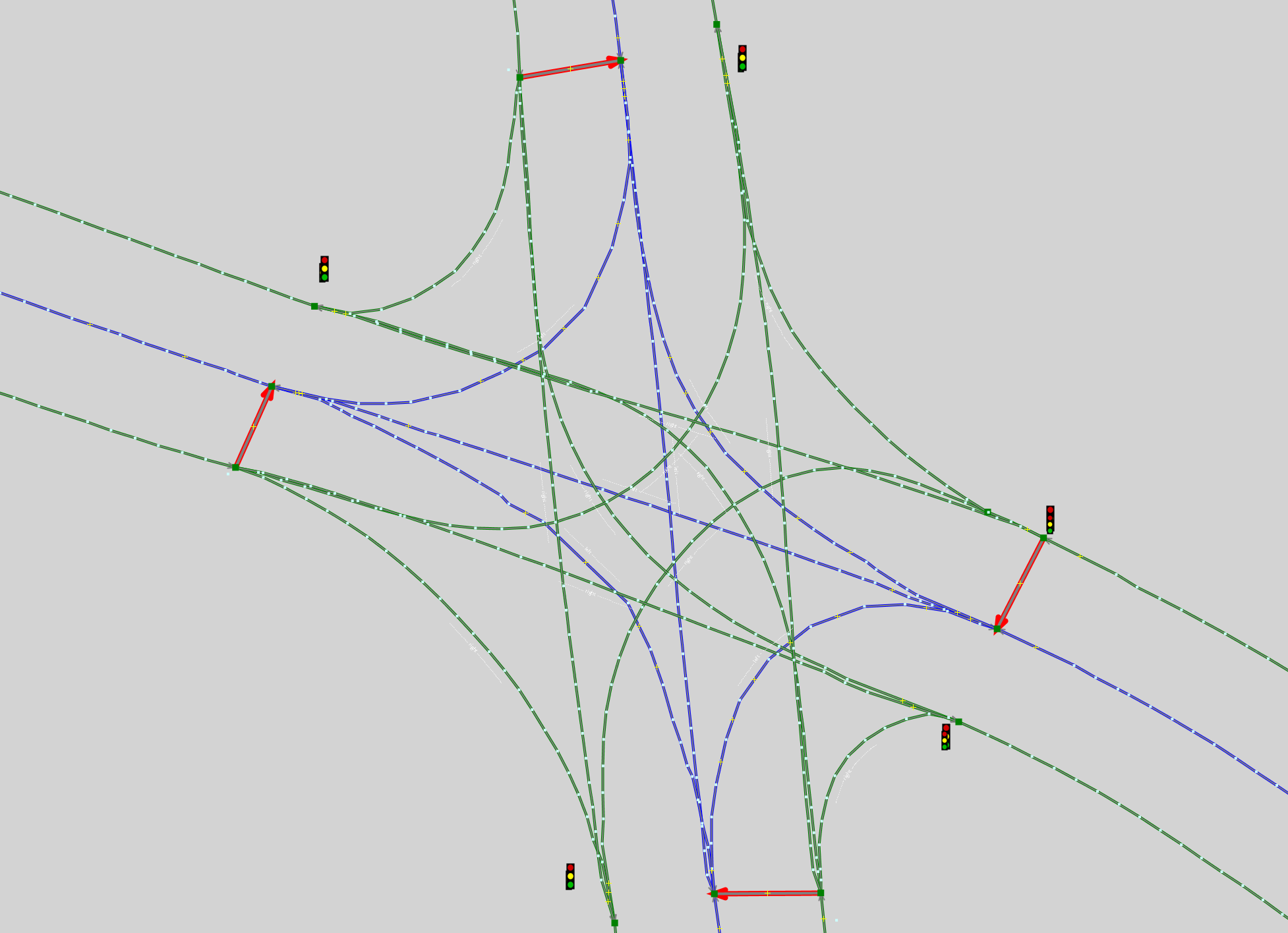
A lanelet intersection with 4 Traffic Lights.
<!-- Regulatory Element: Traffic Light East -->
<relation id='-773927' >
    <member type='node' ref='-5145134' role='refers' />
    <member type='way' ref='-1948897' role='ref_line' />
    <tag k='name' v='tl_east'/>        <!-- a unique name -->
    <tag k='subtype' v='traffic_light' />
    <tag k='type' v='regulatory_element' />
</relation>
<!-- Regulatory Element: Traffic Light West -->
<relation id='-5000074'>
    <member type='way' ref='-1949336' role='refers' />
    <member type='way' ref='-1948894' role='ref_line' />
    <tag k='name' v='tl_west' />
    <tag k='subtype' v='traffic_light' />
    <tag k='type' v='regulatory_element' />
</relation>
<!-- Regulatory Element: Traffic Light North -->
<relation id='-5000076'>
    <member type='way' ref='-1949337' role='refers' />
    <member type='way' ref='-1948895' role='ref_line' />
    <tag k='name' v='tl_north' />
    <tag k='subtype' v='traffic_light' />
    <tag k='type' v='regulatory_element' />
</relation>
<!-- Regulatory Element: Traffic Light South -->
<relation id='-5000078' >
    <member type='way' ref='-1949340' role='refers' />
    <member type='way' ref='-1948896' role='ref_line' />
    <tag k='name' v='tl_south' />
    <tag k='subtype' v='traffic_light' />
    <tag k='type' v='regulatory_element' />
</relation>

<!-- All Traffic Light Objects -->
 <way id='-1949276' >
    <nd ref='-5145134' />
    <nd ref='-5145171' />
    <tag k='type' v='traffic_light' />
  </way>
  <way id='-1949324' >
    <nd ref='-5145212' />
    <nd ref='-5145213' />
    <tag k='type' v='traffic_light' />
  </way>
  <way id='-1949336' >
    <nd ref='-5145227' />
    <nd ref='-5145226' />
    <tag k='type' v='traffic_light' />
  </way>
  <way id='-1949337' >
    <nd ref='-5145229' />
    <nd ref='-5145228' />
    <tag k='type' v='traffic_light' />
  </way>
  <way id='-1949340' >
    <nd ref='-5145233' />
    <nd ref='-5145232' />
    <tag k='type' v='traffic_light' />
  </way>
The lanelet for which the Traffic Light is applied must contain the reference to the Regulatory Element. Note how a circular reference is not needed (unlike RightOfWay and AllWayStop intersections where the regulatory element also contains a reference to all lanelets).
 <relation id='-773899' action='modify' visible='true'>
    <member type='relation' ref='-773927' role='regulatory_element' />
    <member type='way' ref='-1948878' role='left' />
    <member type='way' ref='-1948854' role='right' />
    <tag k='lane_type' v='driving' />
    <tag k='speed_limit' v='50' />
    <tag k='type' v='lanelet' />
  </relation>
  (...)
Finally, the states are added in the GeoScenario file:
<node id='-1' lat='43.5094' lon='-80.5367'>
    <tag k='gs' v='trafficlight' />
    <tag k='name' v='TL_EAST' />           <!-- matching lanelet regulatory element name -->
    <tag k='states' v='green,yellow,red' />
    <tag k='duration' v='15.0,3.0,20.0' />
</node>